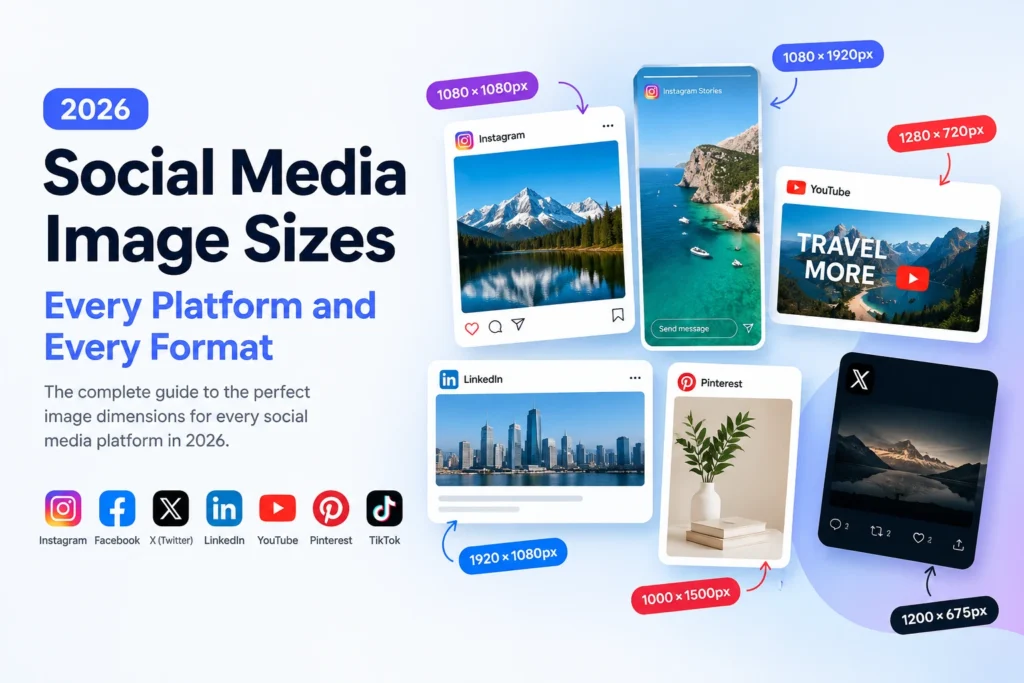
If you use the wrong image dimensions, your social media posts can end up looking cropped, pixelated, and unprofessional. And every platform has different requirements for each type of post. A square post for Instagram is 1080 x 1080px. LinkedIn article cover size: 1920 × 1080px. YouTube Thumbnail Dimensions 1280 x 720px Upload at the wrong size, and the platform will either automatically crop your image or recompress it so aggressively that it looks blurry. This guide has all the right image sizes for every platform and post type in 2026 – checked, updated and organized so you can find exactly what you need in seconds.
Why Image Dimensions Matter on Social Media
Every social media platform displays images inside fixed-size containers. When you upload an image that matches those containers exactly, the platform shows it perfectly — no cropping, no stretching, no aggressive recompression. When you upload at the wrong size, the platform does one of three things — it crops the image to fit the container, it stretches or squashes it to fill the space, or it resizes it and then recompresses it aggressively. All three outcomes reduce quality and make your content look less professional than it should.
Recompression by the platform is the primary culprit for low quality. All social media platforms automatically recompress all images uploaded using the respective algorithm, no matter how high quality your original file is. Instagram, Facebook, Twitter, LinkedIn, and Pinterest all automatically recompress all images after they are uploaded using lossy compression. This recompression cannot be avoided. However, uploading your file in exactly the right dimensions ensures that you give the platform’s algorithm the optimal starting point for this process, which limits the negative impact of the unavoidable recompression.
The problem of incorrect dimensions adds another challenge to it. When the social media platform needs to first resize the image before applying the recompression process to it, two factors that negatively affect the quality of the image are applied instead of one — the resize and the recompression. The combination of these processes is much more destructive than recompression alone.
Format matters too. JPG at 80 to 90 percent quality handles platform recompression better than PNG for photographs. PNG holds up better for graphics with text and sharp edges. WebP is increasingly accepted on several platforms and delivers the smallest file sizes — but always check whether the specific platform accepts WebP before uploading.
Instagram Image Sizes 2026
Instagram is the most visual platform and the most strict about image dimensions. It displays images in several different aspect ratios depending on the post type — and each has its own optimal dimensions.
Instagram Feed Post Sizes
Instagram feed posts support three aspect ratios. The platform crops any image that falls outside these ratios automatically — which means uploading at exactly the right dimensions prevents unexpected cropping of your subject.
| Post Type | Dimensions | Aspect Ratio | File Size Limit |
|---|---|---|---|
| Square post | 1080 × 1080px | 1:1 | 8 MB |
| Portrait post | 1080 × 1350px | 4:5 | 8 MB |
| Landscape post | 1080 × 566px | 1.91:1 | 8 MB |
Instagram displays feed images at 1080px wide in the feed but compresses them down to 612px wide for older devices. Upload at 1080px wide at minimum to ensure Instagram has enough pixels to display at full quality on modern high-DPI screens. Portrait (4:5) posts take up more vertical space in the feed — making them more visually dominant and typically generating higher engagement than square or landscape posts.
Best format for Instagram feed posts: JPG at 80 to 90 percent quality for photographs. PNG for graphics, text overlays, and images with sharp edges. Keep file size under 1MB for the fastest upload and best recompression results — even though the platform accepts up to 8MB.
Instagram Stories and Reels Sizes
Stories and Reels both use the full-screen vertical format — the most immersive content format on the platform.
| Format | Dimensions | Aspect Ratio | Safe Zone |
|---|---|---|---|
| Stories | 1080 × 1920px | 9:16 | Keep key content within 1080 × 1420px centre |
| Reels cover | 1080 × 1920px | 9:16 | Keep key content within 1080 × 1420px centre |
| Reels thumbnail | 1080 × 1080px | 1:1 | Full frame used |
The safe zone for Stories is important. Instagram overlays UI elements — the profile picture, username, and interactive elements — over the top and bottom of Stories. Keep all important text and visual elements within the central 1080 × 1420px area to prevent them from being obscured by these overlays.
Instagram Profile Picture Size
Instagram displays profile pictures as circles — it crops your uploaded image into a circular frame automatically. Upload a square image so the circle crop removes equal amounts from all sides.
| Element | Upload Size | Displayed Size |
|---|---|---|
| Profile picture | 320 × 320px minimum | 110 × 110px in feed |
Upload at 320 × 320px as the absolute minimum. For retina sharpness on high-DPI phones, upload at 800 × 800px. Instagram displays it at 110px in the feed but uses larger versions in other contexts — the higher-resolution upload ensures sharpness everywhere the profile picture appears.
Instagram Carousel Post Size
Carousel posts follow the same dimensions as regular feed posts — each slide in the carousel uses the same aspect ratio. All slides in a carousel must use the same aspect ratio — you cannot mix square and portrait slides within one carousel post.
Facebook Image Sizes 2026
Facebook supports more image placement types than any other platform — feed posts, cover photos, profile pictures, event images, group covers, and ad formats all have different requirements.
Facebook Feed Post Sizes
| Post Type | Recommended Size | Aspect Ratio | Notes |
|---|---|---|---|
| Shared image | 1200 × 630px | 1.91:1 | Most common feed image |
| Square post image | 1080 × 1080px | 1:1 | Higher engagement in feed |
| Portrait post image | 1080 × 1350px | 4:5 | Maximum vertical space |
Facebook displays feed images at a maximum of 476px wide on desktop. Upload at 1200px wide minimum to ensure Facebook has enough source material for retina displays and image zoom. Facebook applies significant recompression to all uploaded images — keeping source images under 1MB at appropriate quality helps minimise visible quality loss.
Facebook Cover Photo and Profile Picture Sizes
| Element | Upload Size | Display Size | Notes |
|---|---|---|---|
| Personal profile cover | 851 × 315px | 851 × 315px desktop / 640 × 360px mobile | Design for mobile crop |
| Page cover photo | 851 × 315px | Same as personal | Displays differently on mobile |
| Group cover photo | 1640 × 856px | Cropped to 1640 × 502px | Keep key content centred |
| Profile picture | 170 × 170px minimum | 170 × 170px desktop | Displayed as circle |
The Facebook cover photo presents a specific challenge — it displays differently on desktop and mobile. On desktop it shows at 851 × 315px. On mobile it crops to approximately 640 × 360px — showing more vertical space. Design cover photos with the most important visual elements in the central area to ensure they display well on both contexts. Keep text and logos away from the edges where mobile cropping removes content.
Facebook Event and Ad Image Sizes
| Format | Recommended Size | Notes |
|---|---|---|
| Event cover photo | 1920 × 1005px | Displays at 470 × 174px in event listing |
| Link preview image | 1200 × 630px | Uses Open Graph image from linked page |
| Facebook ad (single image) | 1200 × 628px | 1.91:1 aspect ratio standard |
| Facebook ad (square) | 1080 × 1080px | Higher performance in some placements |
| Facebook carousel ad | 1080 × 1080px | All cards use same square format |
Twitter / X Image Sizes 2026
Twitter rebranded to X but its image handling follows the same technical specifications. Twitter applies particularly aggressive recompression — images often lose noticeable quality after upload even when uploaded at correct dimensions.
Twitter Feed Image Sizes
| Post Type | Recommended Size | Aspect Ratio | Notes |
|---|---|---|---|
| Single image post | 1600 × 900px | 16:9 | Displays in feed at 506px wide |
| Two-image post | 700 × 800px each | 7:8 | Twitter crops to fit two-column layout |
| Three-image post | 700 × 800px (left) / 1200 × 686px (right pair) | Mixed | Complex layout — test before posting |
| Four-image post | 700 × 800px each | 7:8 | Twitter displays in 2×2 grid |
Twitter displays single images in feed with a crop preview — it shows the central portion of the image in the feed timeline and users click to see the full image. Design single-image posts with the most important visual element in the centre of the frame to ensure it appears in the feed preview.
Twitter’s recompression converts PNG uploads to JPG for photographs automatically. Upload photographs as JPG at 85 to 90 percent quality to prevent Twitter from making that conversion with its own quality settings. Upload graphics with text as PNG — Twitter handles PNG better for sharp-edged content.
Twitter Profile and Header Sizes
| Element | Upload Size | Display Size | Notes |
|---|---|---|---|
| Profile picture | 400 × 400px minimum | 200 × 200px | Displayed as circle |
| Header / banner | 1500 × 500px | 1500 × 500px | Profile picture overlaps bottom-left corner |
The Twitter header image overlaps with the profile picture in the bottom-left corner. Keep important content — text, logos, key visual elements — away from the bottom-left quarter of the header image to prevent it from being obscured by the circular profile picture overlay.
LinkedIn Image Sizes 2026
LinkedIn serves a professional audience and image quality directly affects professional credibility. Blurry or poorly cropped images on LinkedIn undermine the professional impression you want to create.
LinkedIn Post Image Sizes
| Post Type | Recommended Size | Aspect Ratio | Notes |
|---|---|---|---|
| Single image post | 1200 × 627px | 1.91:1 | Standard feed image |
| Square image post | 1080 × 1080px | 1:1 | Strong visual presence in feed |
| Portrait image | 1080 × 1350px | 4:5 | Maximum vertical feed space |
| Multiple image post | 1080 × 1080px each | 1:1 | LinkedIn displays in grid |
LinkedIn displays images at a maximum of 552px wide in the desktop feed. Upload at 1200px wide minimum to ensure sharp display on retina screens and in LinkedIn’s lightbox view when users click to enlarge.
LinkedIn Profile and Company Page Sizes
| Element | Upload Size | Display Size | Notes |
|---|---|---|---|
| Personal profile picture | 400 × 400px minimum | 200 × 200px | Displayed as circle |
| Personal background banner | 1584 × 396px | 1584 × 396px | 4:1 aspect ratio |
| Company logo | 300 × 300px | 60 × 60px in feed | Keep logo clearly visible at small sizes |
| Company cover image | 1128 × 191px | 1128 × 191px | Very wide, very short — design accordingly |
| Company page banner | 1128 × 376px | 1128 × 376px | Standard company page header |
The LinkedIn company cover image has an unusual 5.9:1 aspect ratio — extremely wide and short. Design specifically for this format rather than cropping a standard image. Text-heavy designs work poorly at this ratio — bold visual graphics with minimal text work better.
LinkedIn Article and Newsletter Sizes
| Element | Recommended Size | Notes |
|---|---|---|
| Article cover image | 1920 × 1080px | Displays at 744px wide in article |
| Newsletter cover image | 1456 × 816px | Standard 16:9 ratio |
| In-article image | 1200 × 627px | Standard post image size works |
YouTube Image Sizes 2026
YouTube’s primary image considerations are thumbnails — the single most important visual element for driving click-through rates from search results and recommendations.
YouTube Thumbnail Size
| Element | Required Size | Aspect Ratio | File Size Limit |
|---|---|---|---|
| Video thumbnail | 1280 × 720px | 16:9 | 2 MB |
| Minimum accepted | 640 × 360px | 16:9 | Not recommended |
YouTube thumbnails drive more click-through rate variation than almost any other factor in YouTube growth. YouTube displays thumbnails at various sizes — from small 168 × 94px in search results to large 480 × 270px in recommendations. Upload at 1280 × 720px to ensure sharp display at every size.
Design thumbnails specifically for small-size legibility — text must be readable at 168px wide, faces must be recognisable, and visual contrast must be high enough to stand out against adjacent thumbnails. Use JPG at 85 to 90 percent quality for YouTube thumbnails — the 2MB file size limit makes this format practical.
YouTube Channel Image Sizes
| Element | Upload Size | Display Sizes | Notes |
|---|---|---|---|
| Channel profile picture | 800 × 800px | 98 × 98px desktop / 76 × 76px mobile | Displayed as circle |
| Channel banner | 2560 × 1440px | Multiple crops for different devices | Use safe zone for key content |
| Channel banner safe zone | 1546 × 423px centred | All devices show this area | Design critical content here |
The YouTube channel banner displays at different crops on different devices — 2560 × 423px on TV, 2560 × 1440px on desktop (with content areas covered by UI), 1855 × 423px on tablets, and 1546 × 423px on mobile. The central 1546 × 423px safe zone appears on all devices. Design with key content — channel name, tagline, call to action — inside this safe zone and use the outer areas only for decorative background elements.
YouTube Community Post Images
| Format | Recommended Size | Notes |
|---|---|---|
| Community post image | 1080 × 1080px | Square format works best |
| Community post landscape | 1280 × 720px | 16:9 for video-style posts |
Pinterest Image Sizes 2026
Pinterest is a visually-driven discovery platform where image dimensions significantly affect content performance. Taller images take up more vertical space in Pinterest’s grid layout — giving them more visual presence and typically driving higher engagement.
Pinterest Pin Sizes
| Pin Type | Recommended Size | Aspect Ratio | Notes |
|---|---|---|---|
| Standard pin | 1000 × 1500px | 2:3 | Optimal for feed performance |
| Square pin | 1000 × 1000px | 1:1 | Works but less feed space |
| Long pin | 1000 × 2100px | 1:2.1 | Maximum recommended height |
| Video pin thumbnail | 1000 × 1500px | 2:3 | Same as standard pin |
Pinterest’s grid displays pins at a fixed width of approximately 236px on desktop and scales taller pins to fill vertical space proportionally. A 2:3 ratio pin displays at approximately 354px tall — significantly more feed space than a square pin at 236px tall. This extra vertical space translates directly to more visual presence and typically more clicks.
Pinterest accepts files up to 20MB — far more generous than other platforms. Upload at high quality to give Pinterest’s algorithm the best source material for its own recompression. Keep file size under 2MB by using WebP at 85 percent quality — this delivers excellent visual quality within the platform’s limits.
Pinterest Profile and Board Sizes
| Element | Recommended Size | Notes |
|---|---|---|
| Profile picture | 165 × 165px minimum | Displayed as circle |
| Board cover image | 600 × 600px | Square crop of pin image |
TikTok Image Sizes 2026
TikTok is primarily a video platform but has expanded its image post capabilities significantly. Image posts on TikTok use a full-screen vertical format matching the video viewing experience.
TikTok Image Post Sizes
| Format | Recommended Size | Aspect Ratio | Notes |
|---|---|---|---|
| Image post (carousel) | 1080 × 1920px | 9:16 | Full-screen vertical |
| Image post (square) | 1080 × 1080px | 1:1 | Alternative format |
| Image post (landscape) | 1920 × 1080px | 16:9 | Less common on TikTok |
TikTok displays image carousels in the same full-screen viewing experience as videos. The 9:16 vertical format provides the most immersive, native-feeling experience on TikTok. Design for mobile-first viewing — all text must be clearly readable on a phone screen held vertically.
TikTok Profile Image Size
| Element | Recommended Size | Display Size |
|---|---|---|
| Profile picture | 200 × 200px minimum | 100 × 100px in feed |
Snapchat Image Sizes 2026
Snapchat uses an exclusively vertical full-screen format. Every image needs to fill a phone screen held vertically — any other format looks incorrect on the platform.
Snapchat Image Sizes
| Format | Dimensions | Aspect Ratio | Notes |
|---|---|---|---|
| Snap image | 1080 × 1920px | 9:16 | Full screen vertical |
| Story image | 1080 × 1920px | 9:16 | Same as standard snap |
| Spotlight image | 1080 × 1920px | 9:16 | Short-form discovery format |
Snapchat overlays UI elements at the top and bottom of images. Keep critical content within a central safe zone of approximately 1080 × 1600px to prevent important elements from being obscured.
WhatsApp Image Sizes 2026
WhatsApp compresses all shared images aggressively — significantly reducing quality in the process. Understanding how WhatsApp handles images helps you share them at the best possible quality.
WhatsApp Image Sharing
| Sharing Method | Max Size | Compression Applied | Quality Result |
|---|---|---|---|
| Standard photo share | No enforced limit | Heavy recompression | Significant quality loss |
| Document share | 2 GB | No recompression | Original quality preserved |
| Status image | 16 MB | Moderate compression | Acceptable quality |
WhatsApp applies heavy compression to images shared as photos — often reducing a 5MB photograph to 200 to 400KB. This compression is the main reason WhatsApp images arrive looking noticeably degraded.
The workaround is to send images as documents rather than photos. Tap the attachment icon, select Document, then select your image file. WhatsApp sends it without applying photo compression — the recipient receives the original quality file. This works for sharing high-quality photographs where visual quality matters.
For WhatsApp Status images, upload at 1080 × 1920px for full-screen vertical display. Status images receive less aggressive compression than regular photo shares.
General Rules for All Social Media Images
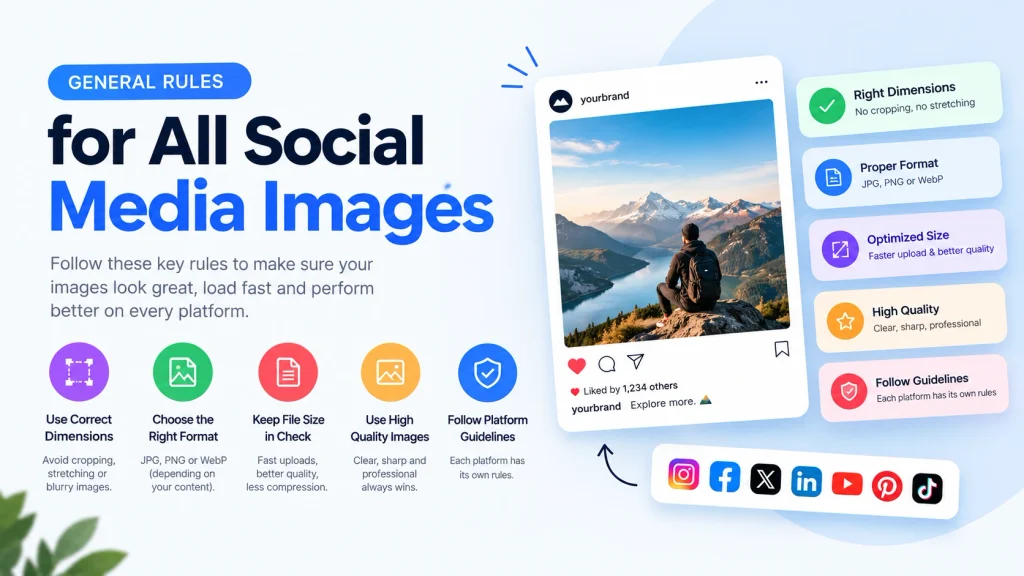
Regardless of platform, these principles apply consistently across every social media image you create and upload.
Use the Correct Format for the Content Type
Use JPG at 80 to 90% quality for photographs in all platforms. The format of JPG has more tolerance for recompression by the platforms in photographic material as compared to PNG – the algorithms of the platforms are optimised for the JPG format. Use PNG in graphic materials which involve texts, logos and sharp edged images as it retains the sharpness of text and geometry of edges better in one round of compression as compared to JPG. WebP is supported by some platforms by 2026 and offers the smallest file size with best quality.
Resize Before Uploading
Always resize images to the correct dimensions before uploading — never rely on the platform to resize for you. Platform resizing adds a second quality-degrading operation on top of the unavoidable recompression. Our free Image Resizer lets you enter exact pixel dimensions and download correctly-sized images instantly — with batch support for processing multiple images simultaneously.
Keep File Sizes Reasonable
Uploading massive files to social platforms does not produce better results — every platform recompresses anyway. Keep images under 1MB for most platforms and under 2MB for platforms with more generous limits. Smaller source files upload faster and give platform algorithms cleaner input because they contain less existing compression to compound.
Design for Small Screen Viewing
More than 80 percent of social media consumption happens on mobile devices. Design every social media image assuming it will primarily be viewed on a phone screen — text must be large enough to read on a 375px wide display, faces and key visual elements must be prominent, and contrast must be high enough to read in varied lighting conditions.
Test How Images Display Before Publishing
Before publishing important content, use each platform’s preview function to check how your image displays in its specific container. Instagram, Facebook, and LinkedIn all show previews before final posting — use these to verify nothing important gets cropped and all text remains readable.
Converting and Resizing Images for Social Media
Getting images to the correct format and dimensions for each platform requires a simple two-step process — resize to the correct dimensions first, then convert to the appropriate format and compress to the target file size.
Our free Image Resizer handles exact pixel dimension targeting for any platform. Enter the width and height for the specific post type you need — Instagram portrait, YouTube thumbnail, LinkedIn banner — and download the correctly-sized image. The tool supports multiple file uploads for batch resizing when you need to prepare images for multiple platforms simultaneously.
After resizing, convert photographs from PNG to JPG or WebP using our JPG to WebP converter for the smallest possible files at the best quality. For graphics needing sharp text and edges, keep as PNG or convert to WebP lossless using our PNG to WebP converter.
For any image that needs a background removed before use on social media — product cutouts, portrait photos for profile pictures, graphics for Stories — our free Image Background Remover handles background removal automatically with AI detection. The result saves as a transparent PNG ready for placement on any background colour or gradient.
Social Media Image Sizes — Quick Reference Table
| Platform | Post Type | Dimensions | Aspect Ratio |
|---|---|---|---|
| Feed square | 1080 × 1080px | 1:1 | |
| Feed portrait | 1080 × 1350px | 4:5 | |
| Feed landscape | 1080 × 566px | 1.91:1 | |
| Stories / Reels | 1080 × 1920px | 9:16 | |
| Profile picture | 320 × 320px | 1:1 | |
| Feed image | 1200 × 630px | 1.91:1 | |
| Feed square | 1080 × 1080px | 1:1 | |
| Cover photo | 851 × 315px | 2.7:1 | |
| Profile picture | 170 × 170px | 1:1 | |
| Group cover | 1640 × 856px | 1.91:1 | |
| Twitter / X | Feed image | 1600 × 900px | 16:9 |
| Twitter / X | Profile picture | 400 × 400px | 1:1 |
| Twitter / X | Header banner | 1500 × 500px | 3:1 |
| Post image | 1200 × 627px | 1.91:1 | |
| Profile picture | 400 × 400px | 1:1 | |
| Background banner | 1584 × 396px | 4:1 | |
| Company logo | 300 × 300px | 1:1 | |
| Company cover | 1128 × 191px | 5.9:1 | |
| YouTube | Thumbnail | 1280 × 720px | 16:9 |
| YouTube | Channel banner | 2560 × 1440px | 16:9 |
| YouTube | Profile picture | 800 × 800px | 1:1 |
| Standard pin | 1000 × 1500px | 2:3 | |
| Square pin | 1000 × 1000px | 1:1 | |
| TikTok | Image post | 1080 × 1920px | 9:16 |
| Snapchat | Snap / Story | 1080 × 1920px | 9:16 |
Frequently Asked Questions
1. What happens if I upload the wrong image size to Instagram?
Instagram crops images that fall outside its accepted aspect ratios — between 4:5 (portrait) and 1.91:1 (landscape). An image uploaded outside these ratios gets cropped automatically to the nearest accepted ratio, which often removes important visual elements. Images uploaded at smaller pixel dimensions than 1080px wide get stretched to fill the container — producing visible pixelation and blurriness.
2. Why do my images look blurry after uploading to social media?
Every platform recompresses all uploaded images — this is unavoidable. Blurriness after upload happens most commonly from two causes. First, uploading at incorrect dimensions forces the platform to resize before recompressing — the combined operation degrades quality more than recompression alone. Second, uploading already heavily compressed images gives the platform degraded source material to work from. Fix both by uploading at exact platform dimensions and using source images at 80 to 90 percent quality rather than pre-compressed files.
3. What is the best image size for Instagram in 2026?
For feed posts, 1080 × 1350px portrait gives the best combination of image quality and feed presence — portrait posts take up more vertical space, creating more visual impact. For maximum engagement, portrait format consistently outperforms square and landscape in Instagram feed tests. For Stories and Reels, 1080 × 1920px is the only correct format — anything else shows black bars or gets cropped.
4. What image size works across all social media platforms?
No single size works perfectly on all platforms — each has different display containers and aspect ratios. The closest universal size is 1200 × 630px — which works acceptably on Facebook, LinkedIn, and Twitter for feed posts. But for Instagram, TikTok, and Snapchat, you need platform-specific vertical formats. Create platform-specific versions of important images rather than using one universal size.
5. Should I upload JPG or PNG to social media?
Upload JPG at 80 to 90 percent quality for photographs — platform algorithms handle JPG better for photographic content, and JPG produces smaller file sizes that upload faster. Upload PNG for graphics containing text, logos, and images with sharp geometric edges — PNG preserves these elements better through the first round of platform compression. WebP is increasingly accepted but verify support on each specific platform before making it your default.
6. What is the correct YouTube thumbnail size?
1280 × 720px is the correct YouTube thumbnail size at a 16:9 aspect ratio. Keep file size under 2MB — YouTube’s limit for thumbnails. Use JPG at 85 to 90 percent quality. Design for small-size legibility — thumbnails display as small as 168 × 94px in search results, so text must be large and contrast must be high.
7. How do I share high-quality images on WhatsApp?
Send images as documents rather than photos. Tap the attachment icon, select Document, then select your image file. WhatsApp applies heavy compression to images shared as photos — reducing quality significantly. Images sent as documents bypass this compression and arrive at the original quality.
8. What is the LinkedIn banner size?
LinkedIn personal profile background banners are 1584 × 396px at a 4:1 aspect ratio. LinkedIn company page banners are 1128 × 376px. Company cover images use a narrow 1128 × 191px format. Each LinkedIn image type has a different aspect ratio — create each version specifically for its format rather than cropping a single image.
9. Why does my Facebook cover photo look different on mobile?
Facebook cover photos display at 851 × 315px on desktop but crop to approximately 640 × 360px on mobile — showing more of the vertical centre and cropping the sides. Design cover photos with important content in the centre of the frame to ensure correct display on both devices. Avoid placing text or important visual elements near the edges.
10. What image format does Pinterest prefer?
Pinterest accepts JPG, PNG, WebP, and GIF. For still images, upload JPG at 85 percent quality for photographs and PNG for graphics with text or sharp edges. The optimal pin size is 1000 × 1500px at a 2:3 ratio — taller pins take up more feed space and typically generate more engagement than square or landscape formats. Keep file sizes under 2MB for fast upload and optimal compression handling.
Conclusion
Getting social media image dimensions right eliminates two common problems simultaneously — unexpected cropping that removes key visual elements, and aggressive recompression that makes images look blurry and unprofessional. Every platform has specific requirements for every post type, and uploading at exact dimensions gives your content the best possible quality after the unavoidable platform recompression that every social platform applies.
The quick reference table in this guide covers every major platform and post type — bookmark it and check it before creating images for any new format. Use the correct format for each content type — JPG for photographs, PNG for graphics with text, WebP where the platform accepts it. Resize to exact dimensions before uploading using our free Image Resizer — and compress to appropriate file sizes using our Image Compressor for the fastest possible uploads and best quality results on every platform.